Search News
Industry Portal
Hot Articles
- How to verify FDA compliance for packaging inks used on food packagingPackaging inks FDA compliant? Learn how to verify food-contact safety through regulatory citations, migration testing, supplier declarations, and process controls.
- When do holographic foils add value to luxury goods packaging?Packaging materials for luxury goods gain impact with holographic foils that elevate shelf appeal, authenticity, and premium unboxing—learn when this finish delivers real value.
- Can nano encryption technology stop counterfeit labels from being copied?Nano encryption technology anti counterfeit labels combine physical security, tamper evidence, and serialization to make copying harder. Explore smarter protection.
Popular Tags
Thermal Transfer Printing Problems and Fixes in Daily Use
Time
Click Count
In daily operations, thermal transfer printing issues like faint images, smudging, ribbon wrinkles, and unreadable barcodes can quickly disrupt maintenance work and product traceability. For after-sales service teams, understanding the root causes behind these common failures is essential to restoring print quality fast. This guide explores practical thermal transfer printing problems and fixes to help technicians reduce downtime, improve label durability, and keep equipment performing reliably.
In packaging, logistics, labeling, and consumables environments, thermal transfer printing is not just a print function. It is a control point for barcode accuracy, anti-counterfeit traceability, warehouse scanning, and long-term label readability across films, adhesive labels, and transport packaging.
For after-sales maintenance personnel, the fastest path to recovery is a structured diagnosis. Most faults can be traced to 4 areas: ribbon-media mismatch, printhead condition, mechanical setup, or environment. When these are checked in the right order, many service calls can be resolved within 15–30 minutes.
Why Thermal Transfer Printing Failures Matter in Daily Service Work
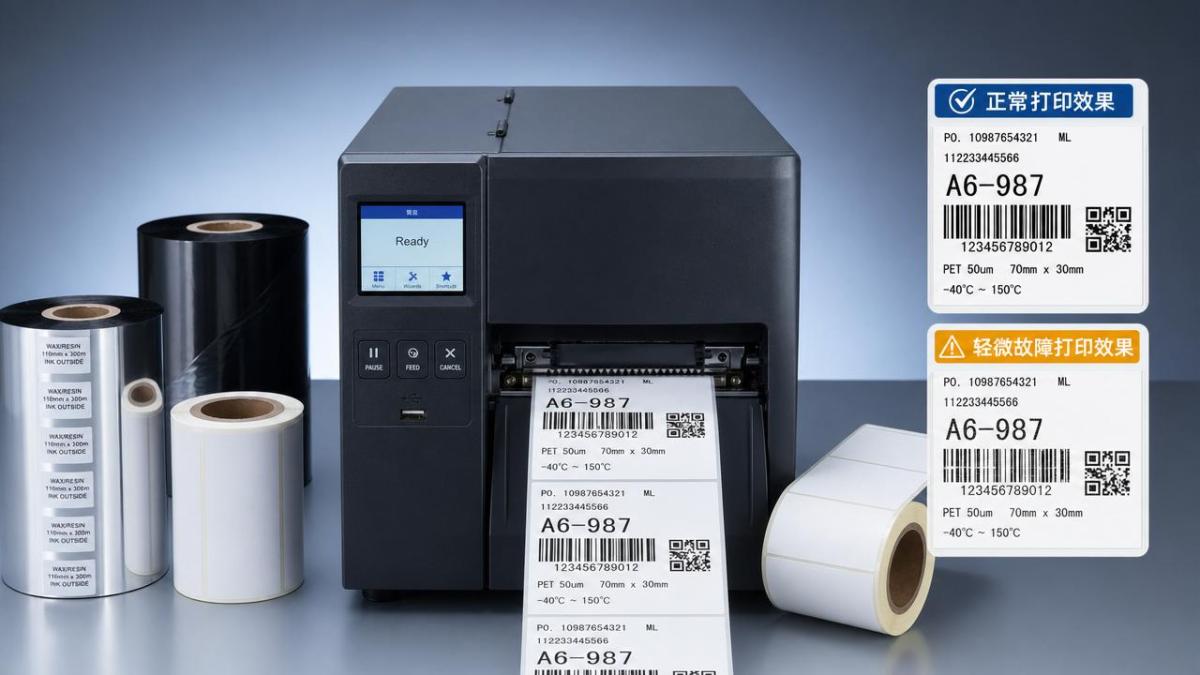
In high-volume packaging lines, even a small thermal transfer printing defect can affect hundreds or thousands of labels in one shift. A barcode grade drop from readable to marginal can create rework, delayed dispatch, and traceability gaps, especially in courier, pharmaceutical, food, and electronics applications.
Service teams are often measured by two practical outcomes: recovery speed and repeat failure rate. If a technician restores printing in 20 minutes but the issue returns within 48 hours, the root cause was not removed. That is why fault isolation must include consumables, printer settings, mechanics, and substrate behavior.
High-impact symptoms that should never be ignored
- Faint print that reduces scan distance from about 30 cm to less than 10 cm
- Smudged text after light rubbing within 3–5 seconds of printing
- Ribbon wrinkles causing diagonal white lines across 10%–40% of the label width
- Missing print zones linked to damaged printhead elements
- Barcode inconsistency between the first 20 labels and the last 20 labels in a batch
Common fault categories in packaging and labeling operations
Across BOPP, PET, coated paper, synthetic labels, tamper-evident constructions, and logistics tags, most field complaints fall into a repeatable pattern. The table below helps technicians map symptoms to likely causes before changing multiple variables at once.
The key takeaway is simple: do not replace parts first. In many thermal transfer printing calls, incorrect ribbon-media pairing or maintenance neglect causes the defect, not electronic failure. That saves both spare-part cost and service time.
Step-by-Step Diagnosis of Thermal Transfer Printing Problems
A reliable service routine should move from the easiest checks to the most invasive ones. For most printers used in labels, anti-counterfeit tags, transport marks, and film packaging identification, a 5-step workflow is enough to isolate over 80% of daily thermal transfer printing problems.
Step 1: Confirm ribbon and label compatibility
Start with the consumables. Wax ribbons usually fit coated paper labels in moderate environments. Wax-resin works better for mixed use where some scratch resistance is needed. Resin ribbons are preferred for PET, PP, BOPP, and chemical-resistant labels, especially when labels face moisture, friction, or outdoor handling for 6–12 months.
If a maintenance call involves smearing on synthetic labels, there is a strong chance the ribbon grade is too soft. A simple thumb-rub test after cooling for 5 seconds can quickly reveal whether the transferred image has bonded well to the face stock.
Typical compatibility guidance
- Coated paper + indoor logistics: wax or wax-resin
- PP/PET/BOPP film labels: wax-resin or resin
- Cold-chain or moisture exposure below 0°C: resin is often safer
- High-friction warehouse circulation: prioritize scratch resistance over low ribbon cost
Step 2: Check printhead cleanliness and wear
A contaminated printhead can mimic multiple faults. Adhesive bleed, ribbon coating residue, dust from paper labels, and environmental particles can lower heat transfer. Cleaning with approved solvent and lint-free material after every 1 ribbon roll or every 8 operational hours is a practical benchmark in busy service environments.
If faint print appears in a repeating horizontal band, inspect for residue buildup. If a perfectly straight vertical white line persists across different labels and ribbons, damaged heating elements are more likely. Test labels printed at 100 mm/s and 150 mm/s can show whether the problem changes with dwell time.
Step 3: Review print speed, darkness, and pressure
Thermal transfer printing quality often depends on the balance between 3 variables: heat, time, and pressure. If speed increases from 100 mm/s to 200 mm/s without raising energy, image density may drop sharply. If darkness is pushed too high, edge spread, ribbon sticking, and premature printhead wear can follow.
For service work, change only one setting at a time. A controlled sequence such as darkness +1, then speed -25 mm/s, then pressure adjustment prevents false conclusions. In many cases, a 10% speed reduction solves poor transfer without needing a new ribbon grade.
Step 4: Inspect mechanics and media path
Ribbon wrinkles are usually mechanical before they are thermal. Check whether the ribbon is loaded flat, the supply and take-up cores rotate smoothly, the media is centered, and the platen roller shows wear grooves. A worn platen can create uneven contact across a 4-inch print width.
Labels with aggressive adhesives or thick multi-layer constructions, such as tamper-evident labels, can also track differently through the printer. When media thickness moves outside the printer’s normal range, head pressure may need balancing from left to right.
Step 5: Validate barcode output, not just visual appearance
A label may look acceptable to the eye and still fail scanner performance. For packaging and logistics operations, verify narrow bars, quiet zones, and edge sharpness on at least 10 consecutive labels. If scan success falls below the operation’s internal threshold, the printing issue is not resolved.
This final step is especially important for anti-counterfeit labeling, warehouse routing, and batch traceability, where one unreadable code can interrupt an entire shipment or investigation process.
Problem-by-Problem Fixes for Daily Thermal Transfer Printing Issues
After the initial diagnosis, technicians need corrective action that is practical in the field. The matrix below summarizes common thermal transfer printing problems and fixes that apply across packaging consumables, logistics labels, shelf tags, and industrial identification media.
These fixes are effective because they focus on the transfer process itself. In thermal transfer printing, the real goal is not maximum heat. It is stable ink release, clean dot formation, and durable bonding to the media surface under the end-use conditions.
Faint images: when darkness is not the only answer
Many technicians react to light print by increasing darkness immediately. That may help, but it can hide the real problem. If the ribbon is a low-energy wax grade and the label is a smooth PET surface, more heat may still produce weak adhesion. The better fix is often a ribbon change plus a moderate setting adjustment.
Another cause is thermal loss from a dirty printhead. Even a thin contamination band can reduce transfer across 5–15% of the print width. Routine cleaning prevents this issue from escalating into suspected head failure.
Smudging and poor resistance: look at end-use exposure
If labels are used on stretch films, cold-chain packs, or high-touch cartons, simple image formation is not enough. After-sales teams should ask 3 questions: Will the label face moisture? Will it rub against adjacent packs? Will it stay readable for more than 3 months? The answers determine ribbon chemistry.
This is especially relevant in PPCS-linked sectors where labels interact with specialty adhesives, BOPP/PET films, and logistics handling. The wrong ribbon can pass a bench test and still fail in transport after only 1 or 2 distribution cycles.
Wrinkles and voids: solve alignment before replacing hardware
Wrinkling often results from uneven ribbon tension, incorrect spindle installation, or media that is narrower than the active pressure zone. Technicians should inspect the ribbon path from unwind to take-up, then run 3–5 test labels after each adjustment. If the wrinkle angle changes, the fault is mechanical and still under control.
When using thicker labels such as security constructions or laminated tags, pressure balance becomes more important. Slight left-right pressure correction can eliminate diagonal voids without any electronic intervention.
Preventive Maintenance, Consumable Selection, and Service Best Practices
The most cost-effective way to reduce thermal transfer printing failures is to prevent them before a service ticket is opened. A preventive approach lowers emergency visits, cuts label waste, and protects traceability in high-volume packaging systems.
Recommended maintenance schedule for field teams
Service intervals vary by workload, ribbon quality, and label construction, but standard routines help. For printers running 1 to 3 shifts, a quick visual check each day and a deeper inspection each week usually provide a strong baseline.
This schedule is particularly useful where multiple consumables are involved, such as adhesive labels, filmic facestocks, and specialty ribbons. Consistency across lots matters because even small coating or adhesive differences can change print performance.
How to choose ribbons and labels with fewer service issues
Procurement and maintenance should work together. When ribbon cost alone drives purchasing, service frequency often rises. A better evaluation model includes at least 4 factors: substrate compatibility, durability requirement, print speed target, and storage environment from 10°C to 35°C or beyond.
- Match ribbon chemistry to face stock, not just printer brand
- Review whether labels are paper, PP, PET, BOPP, or security constructions
- Test at actual line speed, not only low-speed bench conditions
- Check abrasion, solvent, and temperature resistance before full rollout
Frequent service mistakes to avoid
Mistake 1: changing too many settings at once
If darkness, speed, pressure, and ribbon type are all changed together, the true cause stays hidden. Controlled adjustment produces faster long-term results than trial-and-error.
Mistake 2: ignoring the label surface
The topcoat on a label may be optimized for one ribbon family and unstable with another. In packaging applications, this is common when switching between suppliers without revalidation.
Mistake 3: judging by appearance only
Thermal transfer printing success should be measured by barcode readability, rub resistance, and field durability, not only by dark-looking text on the first test label.
Support Value for After-Sales Teams in Packaging Consumables Environments
In integrated packaging systems, printing performance depends on how ribbons, labels, films, adhesives, and handling conditions work together. That is why after-sales teams benefit from a broader consumables view instead of treating the printer as an isolated device.
For organizations working with logistics labels, anti-counterfeit tags, BOPP or PET packaging, and durable barcode applications, thermal transfer printing support should include material compatibility review, preventive maintenance guidance, and print validation under real operating conditions. That approach reduces repeat faults and improves purchasing decisions over the next 3–12 months.
If your team is dealing with recurring thermal transfer printing problems, unstable barcode quality, or ribbon-label mismatch across packaging applications, now is the right time to review the full consumables system. Contact us to discuss your operating conditions, get a tailored troubleshooting plan, and explore more practical solutions for reliable print performance.
Recommended News
 Sep 09, 2026How to assess a water based adhesive materials factory’s quality controlWater based adhesive materials factory quality control: learn how to audit traceability, batch consistency, testing, and change control for safer sourcing.
 Sep 08, 2026How to qualify an electronic protective materials supplier for ESD controlLearn how to qualify an electronic protective materials supplier for reliable ESD control with test data, traceability, lot consistency, and packaging checks.
 Aug 18, 2026What to check before choosing a cryogenic labels supplierCryogenic labels supplier selection starts with performance, not price. Learn what to check for adhesion, print durability, compliance, and supply reliability before you buy.
 Aug 16, 2026How to measure packaging sustainability metrics that actually matterPackaging sustainability metrics that actually matter: learn how to compare carbon, recyclability, performance, and operational yield to make smarter packaging decisions.
 Aug 11, 2026How Low Migration Label Adhesive Technology Supports Food Packaging ComplianceLabel adhesive technology low migration explained: learn how to reduce migration risk, improve food packaging compliance, and choose label constructions that balance safety, performance, and approvals.
 Aug 10, 2026How to Choose Transfer Foils for Labels Based on Print Method and DurabilityTransfer foils for labels: learn how to choose the right option by print method, substrate, and durability needs to improve label performance, reduce rework, and achieve a premium finish.
 Aug 08, 2026How to Evaluate a Coating Materials Supplier for Consistent Quality and Lead TimesCoating materials supplier selection starts with the right questions. Learn how to compare quality consistency, process control, and lead-time reliability to reduce sourcing risk.
 Aug 03, 2026How High-Speed Labeling Technology Affects Accuracy and Throughput in PharmaceuticalsHigh-speed labeling technology pharmaceuticals depend on shapes accuracy, throughput, and compliance. Learn how materials, printing, and inspection drive reliable pharmaceutical packaging performance.
 Aug 02, 2026How to Choose Packaging for PCB Components Based on ESD and Moisture RiskPackaging for PCB components starts with risk, not bag type. Learn how to balance ESD, moisture, handling, and assembly needs to protect yield and choose smarter packaging.
 Jul 30, 2026How to Evaluate Throughput, Accuracy, and Downtime in High Speed Labeling SystemsHigh speed labeling systems should be judged by real throughput, labeling accuracy, and downtime recovery—not brochure speed. Learn how to compare machines for stable output and fewer stoppages.
 Jul 29, 2026How to Choose Food Grade Eco Friendly Packaging Materials for Moisture and Grease ResistanceEco friendly packaging materials food grade: learn how to choose options that balance moisture and grease resistance, food-contact compliance, and sustainability for safer, smarter packaging.
 Jul 27, 2026How to Evaluate a Thermal Labels Supplier for Cost, Quality, and Lead TimeThermal labels supplier evaluation guide: learn how to compare cost, print quality, adhesive performance, compliance, and lead time to reduce risk and choose a reliable partner.
 Jul 23, 2026How to Evaluate Industrial Label Systems for Durability and Total CostIndustrial label systems: learn how to compare durability, compliance, barcode performance, and total cost to reduce failures, control sourcing risk, and choose smarter long-term solutions.
 Jul 15, 2026Pressure Sensitive Label Materials Factory Audit Checklist for Stable QualityPressure sensitive label materials factory audit checklist for buyers: verify coating control, traceability, compliance, and lot consistency to reduce label failure risk.
 Jul 13, 2026How to Evaluate a Sustainable Cushioning Materials Supplier in 2026Sustainable cushioning materials supplier selection in 2026 starts with protection, proof, and scale. Learn how to compare claims, compliance, and total cost with confidence.
 Jul 12, 2026Metallic Cosmetic Packaging Materials: What Affects Finish, Durability, and Brand FitMetallic cosmetic packaging materials shape finish, durability, and brand appeal. Learn what affects gloss, scuff resistance, compliance, and cost before choosing the right premium pack.
 Jul 12, 2026How to Compare Metallic Luxury Packaging Materials for Premium Shelf ImpactMetallic luxury packaging materials compared: learn how to assess shelf impact, durability, print fit, compliance, and cost to choose premium packaging that converts.
 Jul 11, 2026Thermal Labels for Barcode Printing: Top Mistakes That Raise Replacement CostsThermal labels for barcode printing can drive hidden replacement costs when materials miss real conditions. Discover the top mistakes, how to prevent scan failures, and choose labels that cut waste.
 Jul 05, 2026Industrial Adhesive Technology for Laminating: Key Factors for Material SelectionIndustrial adhesive technology for laminating: discover how to choose the right chemistry for better bonding, faster converting, compliance, and lower total packaging cost.
 Jul 04, 2026Decorative Packaging Foils Supplier Middle East: 6 Checks Before You ShortlistDecorative packaging foils supplier Middle East guide: discover 6 practical checks to compare quality, compliance, lead times, and total value before you shortlist a vendor.
 Jul 03, 2026Protective Packaging Cost Breakdown: Material, Labor, Storage, and Damage RiskProtective Packaging cost goes beyond material price. Learn how labor, storage, and damage risk shape total packaging spend, and discover smarter ways to cut costs without hurting performance.
 Jul 02, 2026High Speed Labeling Supplier Checklist: Downtime, Accuracy, and SupportHigh speed labeling supplier checklist: compare downtime risk, label accuracy, material fit, and after-sales support to cut hidden costs and choose a more reliable production partner.
 Jun 30, 2026Embossed Shelf Packaging: When It Improves Impact and When It Adds CostEmbossed shelf packaging can boost shelf impact, grip, and premium appeal—but when does it justify the extra cost? Explore practical value, risks, and smarter packaging decisions.
 Jun 30, 2026How to Choose Thermal Labels for Barcode Printing That Scan ReliablyThermal labels for barcode printing: learn how to match face stock, adhesive, printer, and ribbon for reliable scans, fewer failures, and better supply chain performance.